A Simple Guide to Microsoft 365 Licenses for Small Businesses
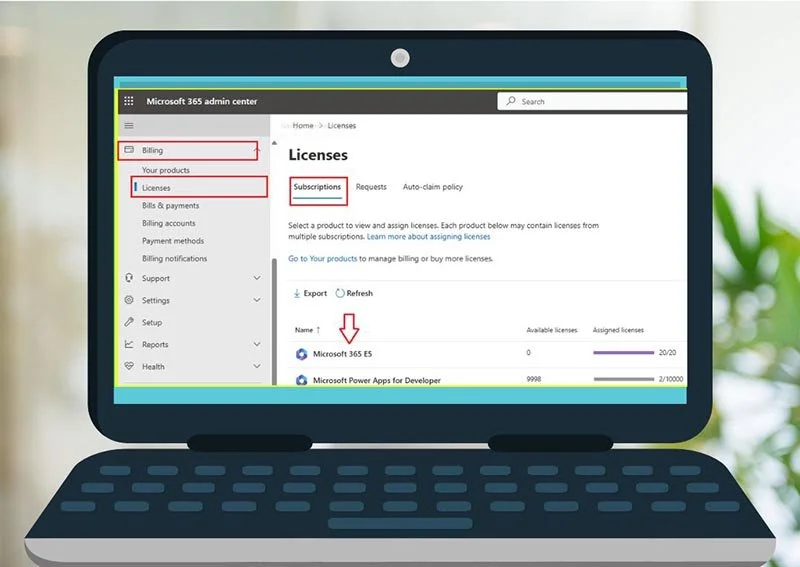
Whether you’re running a growing business or just getting started, managing your Microsoft licenses might feel a bit like trying to read a foreign language.
What’s a license? Do you really need all those subscriptions? And what happens if you mess it up?
Don't worry - you don’t need to be an IT expert to get this right. This blog breaks it down in plain English so you can feel confident managing your Microsoft 365 licenses and making the most of your investment.
What Is a Microsoft License? A Microsoft license is essentially a subscription that gives you access to Microsoft products - like Word, Excel, Outlook, Teams, and more. If your business uses Microsoft 365 (formerly Office 365), every user (employee) needs a license.
Each license type comes with different features and costs, depending on what your team needs.
Why Is Managing Microsoft Licenses Important? Licenses aren’t just about giving people access to tools - they also impact:
Your costs: You pay per license, so unused licenses = wasted money.
Security: If someone leaves your company but still has an active license, they may still have access to company data.
Productivity: The right licenses ensure your team has the tools they need (and aren’t missing key features).
Common License Types for Small Businesses. Here are a few popular Microsoft 365 license types:
Microsoft 365 Business Basic: Email, Teams, and online Office apps
Microsoft 365 Business Standard: Includes full desktop apps like Outlook, Word, Excel, and more
Microsoft 365 Business Premium: Adds advanced security and device management tools
Not sure which one you have? It’ll be listed under each user’s profile in the Admin Center.
Do I Need to Do This Myself? Not necessarily. If you work with an IT provider (like an MSP), they often manage licenses for you - and can help optimize your subscriptions so you're not overpaying.
But if you're managing it solo, the Admin Center is designed to be user-friendly - and now that you know the basics, you're already ahead of the curve.
Final Thoughts: Keep It Simple
Managing Microsoft licenses doesn’t have to be a headache. Just remember:
Review your licenses regularly
Assign them only when needed
Remove them when someone leaves
Adjust your subscription based on what your team actually uses
By staying on top of your licenses, you’ll save money, improve security, and ensure your team has the tools they need to succeed.
Bonus Tip: Don’t Forget About Add-Ons
Need email encryption or advanced cybersecurity features? Microsoft also offers add-ons to licenses. Make sure you're not paying for something you don’t need - or missing something you do.
Want Help Managing Your Licenses? If you’d rather not manage Microsoft 365 licenses on your own, we’re happy to help. Whether you're just getting started or cleaning up a messy setup, Simplex-IT can take the guesswork out of licensing. Schedule a call with us or visit our Learning Center for more information. We're here to help!