Simplex-IT, Professional Services Director
Kurt is the Professional Services Director at Simplex-IT and has a BS in Information Technology from Youngstown State University. Kurt has spent his entire career working in IT. He was a member of an in-house IT department at a regional pallet manufacturer for over a decade before transitioning to Simplex-IT in 2017.
Kurt started at Simplex-IT as a service desk technician and gradually started taking on project work before becoming the project team lead. Now as Professional Services Director, Kurt manages the scoping, quoting, and execution of all projects as well as handles IT-oriented quarterly business reviews and vCIO functions with clients.
Connect with Kurt on LinkedIn: https://www.linkedin.com/in/kurt-ketcham/
Kurt Ketcham Seen In Our Videos:
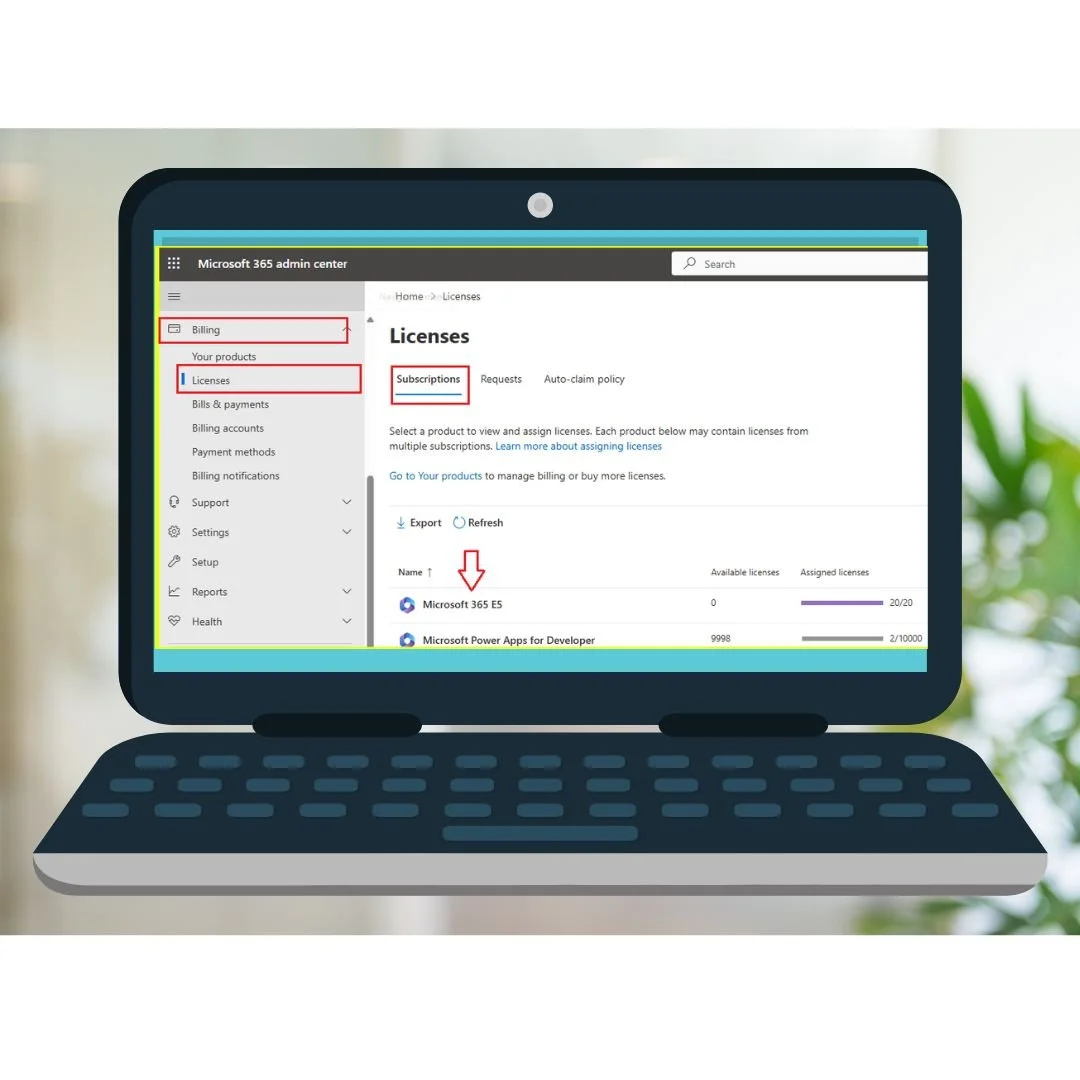
Managing Microsoft 365 licenses doesn’t have to be overwhelming. Whether you’re running a startup or scaling your business, understanding how Microsoft licensing works is key to saving money, boosting security, and giving your team the tools they need to succeed.
Visit our Learning Center to view more videos!
Bloatware is the annoying software that comes pre-installed on new computers, phones, and tablets often without your permission. In this video, we break down what bloatware is, why it can slow down your device, and how to remove it for good.
Visit our Learning Center to view more videos!
Is Windows 11 running slow? Wondering how to speed it up or what bloatware to remove? This video is your complete Windows 11 Performance Guide, we’ll walk you through how to uninstall unnecessary apps, fix slow performance, and optimize your PC for speed and reliability.
Visit our Learning Center to view more videos!
Kurt Ketcham Featured Blogs:
Whether you’re running a growing business or just getting started, managing your Microsoft licenses might feel a bit like trying to read a foreign language. What’s a license?
Have you ever bought a brand-new computer or phone, only to find it already packed with apps and programs you never asked for? That’s bloatware - extra software that comes pre-installed on a device, often taking up space and slowing things down.
Windows 11 is sleek and modern, but it also comes with pre-installed apps (bloatware) and background processes that can slow it down. If your system feels sluggish, don’t worry - we’ll cover what to uninstall and how to speed up Windows 11 to get the best performance.
Windows 11 has been out for a while now, and if you’re still running Windows 10, you might be wondering: Can my PC handle the upgrade? Or worse, Why won’t my PC upgrade? Before you shake your fist at Microsoft, let’s break down how to check your PC’s compatibility and what might be holding it back.
As we head into 2025, the cybersecurity landscape is rapidly evolving, with new threats and challenges emerging every day. From AI-powered cyberattacks to sophisticated phishing schemes, it’s critical that your business is prepared to defend itself against these ever-changing risks. But where do you start, especially if you're not an IT expert? Don’t worry—we’ve got you covered.
As a business owner, you might not spend much time thinking about what version of Windows your computers are running. But here’s the thing: if you're still using older versions of Windows, it could soon put your business at risk. In 2025, several versions of Windows will reach “End of Life,” meaning they’ll stop receiving security updates. This could leave your systems vulnerable to attacks.

As AI adoption grows across organizations, many businesses are discovering that employees are already using AI tools without formal oversight. Understanding where AI is being used, what data is being shared, and how governance is managed is essential for reducing risk.
Play Video
As AI adoption grows across organizations, many businesses are discovering that employees are already using AI tools without formal oversight. Understanding where AI is being used, what data is being shared, and how governance is managed is essential for reducing risk while supporting innovation.
Key Takeaways
- AI adoption often begins before leadership has visibility into it
- Shadow AI can create security, compliance, and governance concerns
- Understanding what AI tools are being used is the first step toward managing risk
- Employees need clear guidance about what information can and cannot be shared
- Effective AI governance requires ownership, visibility, and oversight
- Responsible AI adoption balances productivity gains with data protection
The goal is not to stop AI usage. The goal is to understand it, govern it appropriately, and ensure it aligns with your organization's security and business objectives. Explore more about AI governance and business technology in our Learning Center.