USB Hub vs. Docking Station: Which Do You Need?
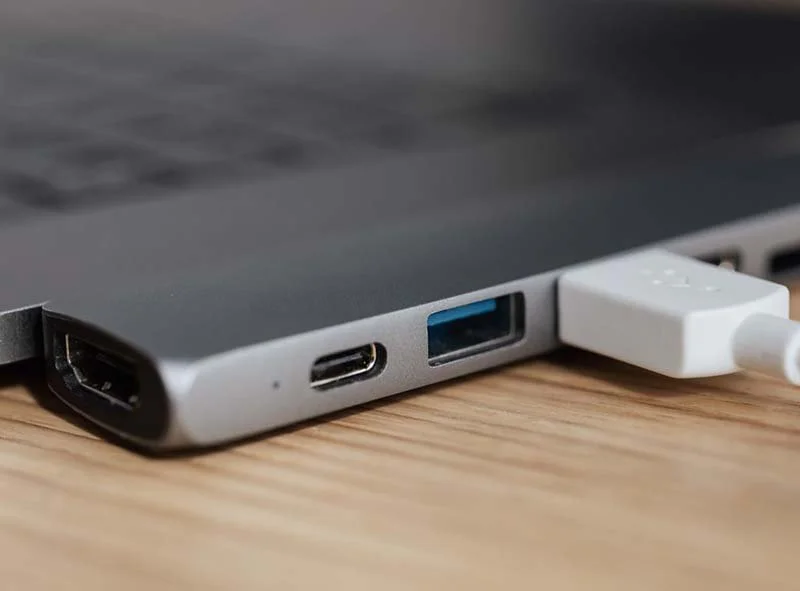
A USB hub adds more USB ports to your laptop, while a docking station gives your laptop a fuller workstation setup with monitors, charging, Ethernet, audio, and more connection options.
If you only need to plug in a mouse, keyboard, or headset, a USB hub may be enough. If you use multiple monitors, need reliable internet, or want one cable to connect your whole desk setup, a docking station is usually the better choice.
Prefer to watch instead? Here’s a quick video explaining the difference between a USB hub and a docking station.
Key Takeaways
What Is a USB Hub?
A USB hub is basically a power strip for USB ports. You plug it into your laptop, and it turns one USB port into several. That can be helpful if your laptop only has a couple of ports, but you need to connect a few basic accessories. A USB hub is usually best for things like:
A mouse
A keyboard
A headset
A flash drive
A webcam
Other simple USB accessories
It is small, portable, and usually more budget-friendly than a docking station. But a USB hub is still a fairly simple device. It gives you more ports, but it does not usually turn your laptop into a full desk setup. It is a quick fix for light-duty connections, not a complete workstation solution.
What Is a Docking Station?
A docking station is a more powerful device that connects your laptop to a full workstation setup. Instead of just giving you more USB ports, a docking station can help connect your laptop to things like:
One or more monitors
A wired Ethernet connection
Keyboard and mouse
Speakers or headphones
External storage
Power charging
Other office equipment
The biggest benefit is convenience. You can plug one cable into your laptop and connect to almost everything on your desk. No crawling under the desk. No guessing which cable goes where. No daily game of “why is this monitor not working today?” Usually.
USB Hub vs. Docking Station: The Main Difference
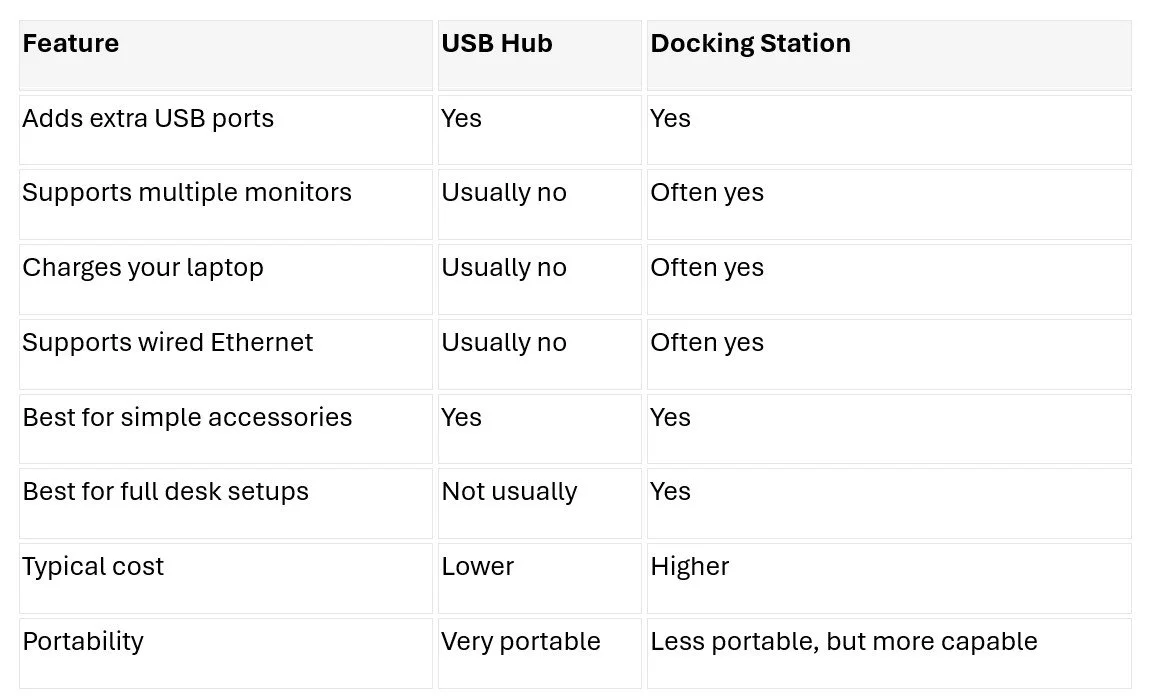
The simplest way to explain it is this: A USB hub gives you more ports. A docking station gives you a more complete workstation. A USB hub is helpful when you need a few extra USB connections. A docking station is helpful when you want your laptop to behave more like a desktop computer. Here’s the difference in plain English:
When Should You Use a USB Hub?
A USB hub is a good choice if your setup is simple. For example, if you work from home or move around often and just need to connect a few accessories, a hub may be all you need. It is easy to throw in a bag, simple to use, and usually does not require much setup. A USB hub may be the right fit if:
You only need a few extra USB ports
You are plugging in basic devices
You do not need multiple monitors
You do not need laptop charging through the hub
You want something small and inexpensive
You frequently work from different locations
For a basic laptop setup, a USB hub can absolutely get the job done. Just do not expect it to perform miracles. It is more “helpful little adapter” than “office command center.”
When Should You Use a Docking Station?
A docking station is the better choice when your laptop is part of a more permanent desk setup. If someone uses multiple monitors, takes video calls, transfers larger files, or needs a cleaner office setup, a docking station usually makes more sense. A docking station may be the right fit if:
You use two or more monitors
You want one cable to connect your desk setup
You need a wired Ethernet connection
You want your laptop to charge while connected
You use several devices at once
You want a cleaner, less cluttered workspace
You regularly disconnect your laptop and take it with you
For offices, docking stations can make everyday work easier. Employees can sit down, plug in one cable, and get started. Very futuristic. Very “we defeated the cable pile.” For now.
Why the Wrong Choice Can Cause Problems
USB hubs and docking stations can look similar, especially when you are just shopping for “something with more ports.” But choosing the wrong one can lead to frustration. A USB hub might not support your monitor setup. It might not charge your laptop. It might slow down if several devices are connected at once. And if someone expected it to handle everything a docking station handles, they may end up with a messy desk and a black monitor.
Docking stations can also create issues if they are not matched correctly to the laptop. Not every laptop supports the same video output, charging, or connection standards. So even with a docking station, it is worth making sure the device is compatible before buying.
Basically, “it has the right plug” is not always the same as “it will do the thing you want.” Annoying, but very on-brand for technology.
Speed and Performance Matter Too
USB hubs share bandwidth across connected devices. That means if you are using several accessories at once, performance can slow down depending on what is connected. For basic devices like a mouse or keyboard, that probably will not matter much. But if you are transferring large files, using a webcam, and running other devices through the same hub, you may notice issues.
Docking stations are usually better suited for heavier workloads. Many are built for faster data transfer, more stable connections, and multiple devices running at the same time.
This matters more in business environments where employees need their technology to work consistently. A slow or unreliable setup may seem like a small issue, but those small issues can add up quickly. A few minutes of cable troubleshooting here. A monitor issue there. Suddenly, the “cheap fix” is not feeling quite as cheap.
Real Talk: You Might Not Need the Bigger Option
A docking station is not always the answer. If you only need to connect a mouse and keyboard, buying a full docking station may be overkill. A USB hub is simpler, cheaper, and easier to carry around. On the other hand, if your team is setting up office workstations, using multiple monitors, or trying to reduce daily tech frustrations, a docking station can be worth it. The goal is not to buy the most expensive accessory. The goal is to buy the one that actually fits how the person works. Wild concept, apparently.
Which One Is Better for Businesses?
For businesses, docking stations are often the better long-term choice for employees with dedicated workstations. They can help create a more consistent setup, reduce cable clutter, and make it easier for employees to move between mobile and desk work. That can be especially useful in offices where laptops are the primary device but employees still need a full desktop-like experience.
USB hubs still have a place. They are great for travel, simple work-from-home setups, or employees who only need a few extra ports. A good rule of thumb:
Use a USB hub for simple, temporary, or portable setups.
Use a docking station for full workstations, multiple monitors, and daily office use.
Frequently Asked Questions
Is a docking station the same as a USB hub? No. A USB hub mainly adds extra USB ports. A docking station usually adds more capabilities, such as monitor support, Ethernet, charging, audio connections, and faster data transfer.
Can a USB hub support two monitors? Usually, no. Some specialized adapters may support display output, but a standard USB hub is not designed to run multiple monitors. If you need multiple displays, a docking station is usually the better option.
Does a USB hub charge your laptop? Most USB hubs do not charge your laptop. Some USB-C hubs may support power delivery, but you need to check the specs carefully. Many docking stations are designed to charge your laptop while connected.
Is a docking station worth it for a small business? It can be, especially if employees use multiple monitors or work from a dedicated desk. A docking station can reduce cable clutter and make it easier to connect everything with one cable.
Which is better for working from home? It depends on your setup. If you only need a keyboard, mouse, and headset, a USB hub may be enough. If you use monitors, Ethernet, charging, and several accessories, a docking station is likely the better choice.
The Bottom Line
USB hubs and docking stations both give you more ways to connect devices, but they solve different problems. A USB hub is best when you just need a few more ports. A docking station is best when you want a complete workstation setup with monitors, charging, wired internet, and fewer cables to deal with every day.
For businesses, the right choice depends on how employees actually work. A simple setup may only need a hub. A full office workstation probably needs a docking station.
At Simplex-IT, we help businesses simplify their technology setups so employees can focus on their work instead of wrestling with cables. If you are not sure what setup makes sense for your team, a technology assessment can help you understand your options without turning your desk into a cable museum.
Prefer to watch instead? Here’s a quick video explaining the difference between a USB hub and a docking station.